

How it works
Overview
The core function of webforai is converting HTML to Markdown, built on the Syntax Tree ecosystem. This process happens in three steps:
- Convert HTML to Hast. (Hypertext Abstract Syntax Tree)
- Convert Hast to Mdast. (Markdown Abstract Syntax Tree)
- Convert Mdast to Markdown.
What makes this special is the content extraction in step 1. This ensures that only the main content—the part humans care about—is extracted from the HTML. After that, the rest of the transformation is handled using fine-tuned utilities from the Syntax Tree ecosystem.
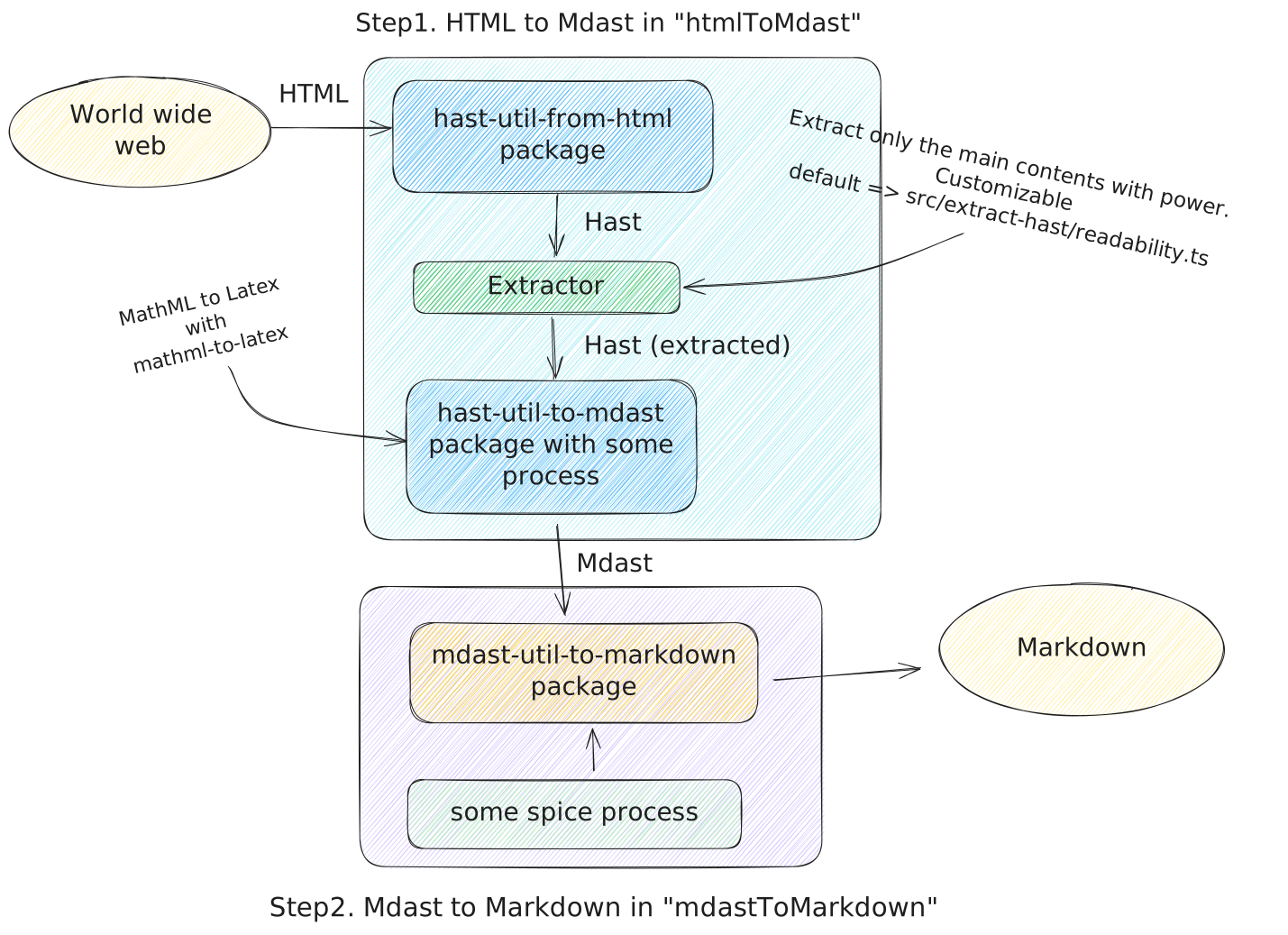
Extractor
In webforai, the process of extracting the main content from a web page is abstracted into a component called the Extractor. This is a flexible system designed to make content extraction simple and customizable.
Extractor Interface
The Extractor is a function that takes in two things:
- A Hast object, which represents the structure of the HTML.
- Optional metadata, such as the language or URL of the page.
The Extractor processes this input and returns a new Hast object that represents the cleaned-up, extracted content.
import type { Nodes as Hast } from "hast";
type ExtractParams = { hast: Hast; lang?: string; url?: string };
type Extractor = (params: ExtractParams) => Hast;Default Extractor
The default, autoExtractor, first tries the site adapters (GitHub, Wikipedia, YouTube,
Hacker News, documentation generators, …). For every other page it runs kiwameExtractor — kiwame (極め, an appraiser's verdict), a learned
block classifier:
- The page is split into text blocks — runs of inline content inside one block-level element.
- Each block gets cheap features: its text statistics and those of its neighbours, where it sits
in the document, class and role hints, where it sits relative to the block that repeats the
page's title, and what the heuristic
takumiExtractor(Readability-style container scoring) would keep. - A small gradient-boosted tree model, plus a second stage that looks at its neighbours' scores and at where each score sits within the page, estimates the probability that each block is main content. A small sequence model reads the same blocks in page order — their features, hashed words and character pairs, and the tag and class names around them — and its estimate is averaged with the trees'.
- The tree is pruned to the kept blocks, keeping the original structure, so headings, lists, tables and code convert as before. Link-only blocks the models chose to keep (a grid of product cards, a list of results) survive the final clean-up; a trailing "Related articles" rail or feedback widget still ends the content.
Both models ship as plain TypeScript (no WASM, no runtime dependency; about 220 KB of weights,
the sequence model as int8), so they run anywhere the library does. See Benchmarks for how the output compares with other tools. The heuristic extractor is still available
as takumiExtractor (CLI: --extractor takumi), and it is what kiwameExtractor falls back to
if the model keeps nothing.
Extraction Report and Confidence
htmlToMarkdownWithMetadata also returns what the extractor did:
import { htmlToMarkdownWithMetadata } from "webforai";
const { markdown, extraction } = htmlToMarkdownWithMetadata(html, { url });
// extraction: { extractor: "kiwame" | "takumi" | "adapter", confidence?: number }extractor names the path that produced the content: a site adapter, kiwame, or the heuristic
fallback. For kiwame's results, confidence (0–1) estimates how well the selection matches the
page's main content — roughly the expected token F1. Most pages come out well; a minority fail
badly (a listing whose items were dropped, an article whose navigation was kept), and those show in
how the block scores spread over the page and in whether the heuristic extractor agrees. A small
model over a dozen such page statistics produces the estimate, at no measurable cost. Use it to
flag pages for review, retry with other options, or weigh results; it is absent for site adapters
and custom extractors. Lower-level callers can receive the same report through
htmlToMdast(html, { onExtraction }).
Agent Output
readerExtractor (reader mode, the default; also exported as autoExtractor) keeps only the main
content — what a browser's reader view shows. An AI agent browsing a site also needs the links it might follow
next. agentExtractor keeps exactly the same main content, then appends the reader comments and the
page's other links, grouped by what they are for:
<main content>
## Comments
...
## Links
### Related
- [Sourdough starter](https://example.com/sourdough)
### Pagination
- [Next recipe](https://example.com/recipes/bread/2)
### Section navigation
### Breadcrumb
### Site navigationShare buttons, ads, sign-up boxes and legal links are left out, each link is listed once (under its
most specific role), and empty groups are omitted. The roles come from small per-role models over
kiwame's block features plus class, aria-label and rel hints and where each block sits relative
to the main content (about 130 KB of weights, loaded only when you import agentExtractor).
On a page a site adapter claims (WordPress, for one), the adapter's output is the content and the
link sections are still built from the whole page. commentsExtractor
(preset comments) is the same without the links: the main content, then the reader comments.
import { htmlToMarkdown, agentExtractor, createAgentExtractor } from "webforai";
const forAgents = htmlToMarkdown(html, { url, extractors: agentExtractor });
// Only the links that move through the site's content, no global menus:
const nextSteps = createAgentExtractor({ roles: ["related", "pagination", "local_nav"] });CLI: webforai <url> --extractor agent; on the hosted platform, convert: { extractor: "agent" }.
presetExtractors(name) returns the extractors option for any preset name ("agent",
"reader", "kiwame", …), for code that takes the preset from configuration.
Customizing the Extraction
webforai allows you to define multiple extractors and chain them together. The Hast object is passed from one Extractor to the next in the order they are defined, allowing you to fine-tune the extraction process.
You can also create your own custom Extractor to implement specific algorithms or extraction logic.
Passing extractors replaces the default pipeline; include autoExtractor in the array to keep it
(extractors: [autoExtractor, customExtractor]), or pass false to disable extraction.
import { htmlToMarkdown } from "webforai";
import { loadHtml } from "webforai/loaders/fetch";
import type { Extractor } from "webforai";
const customExtractor: Extractor = (params) => {
const { hast, url } = params;
// Your custom extraction logic here
return hast;
};
const html = await loadHtml("https://example.com");
const markdown = htmlToMarkdown(html, {
extractors: [customExtractor],
});