


Any HTML to the cleanest Markdown, for humans and AI agents.
Reader mode extracts the main content of a page, like Mozilla Readability, with the best quality of the converters we benchmarked. Agent mode adds only the links an AI agent needs to explore the site, for about half the tokens of the whole page. Benchmarks ↓
npm i webforai
# or just run
npx webforai-cliTry it
Paste any URL and see the Markdown webforai produces — converted live by the hosted
webforai platform, the same pipeline behind the API and --engine auto.
region: "jp") is on paid plansPress Convert or pick an example — the Markdown and its rendered preview appear side by side. This is reader mode: the main content only; pages that need JavaScript are rendered first.
Benchmarks
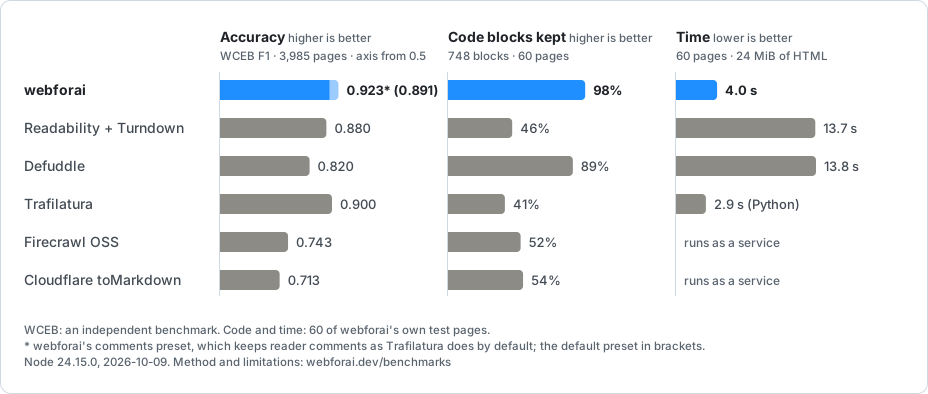
Reader mode: main content. F1 on WCEB, 3,985 pages: webforai 0.923 (keeping reader comments, as Trafilatura does), Trafilatura 0.900, Readability + Turndown 0.880, Defuddle 0.820. webforai keeps 98% of code blocks; Readability + Turndown keeps 46%. It converts 60 pages in 4.0 s where Readability + Turndown takes 13.7 s.
Agent mode: following links. On 290 tasks that ask a model to follow a related or next article, Haiku 5.5 and Sonnet 5.5 pick the right link from agent mode's output 93.8% and 94.1% of the time, as often as from the whole page converted by Turndown (92.9%, 94.8%), at 2,426 median tokens against 4,533. Same accuracy, about half the tokens.
Method, every pipeline's configuration and the limitations: Benchmarks.
Three ways to use it
The same extraction engine, wherever you want to run it.
npm i webforaiConvert HTML you already have — in Node.js, browsers, Deno or Cloudflare Workers. Free, local, no limits.
npx webforai-cli <url>One command from URL or HTML file to Markdown on stdout. Built for pipes, scripts and AI agents.
POST /v1/scrapeWe run the browsers, proxies and queues: scrape, batch and crawl over HTTP. 1,000 free credits every month.
Overview
import { htmlToMarkdown } from "webforai";
import { loadHtml } from "webforai/loaders/fetch";
// Load html from url
const url = "https://www.npmjs.com/package/webforai";
const html = await loadHtml(url);
// Convert html to markdown
const markdown = htmlToMarkdown(html, { baseUrl: url }); Features
- Main content, found by a small model — site adapters first, then kiwame, a learned block classifier in plain TypeScript (no LLM calls, no WASM, no network calls). How it works
- Site adapters — GitHub, Stack Overflow, npm, Wikipedia, Reddit, YouTube, Hacker News, Zenn, Qiita, WordPress, documentation generators and more, with generic extraction as the fallback.
- Markup that survives — code blocks with their language, GFM tables, KaTeX/MathJax as LaTeX, lazy-loaded images, definition lists.
- Built for agents —
agentExtractorappends the page's other links grouped by role; the CLI (npx webforai-cli <url>) prints Markdown or JSON and ships an Agent Skill. - Easy to embed — ~300 KB gzipped in a Worker, no Node.js built-ins; runs in Node.js, Cloudflare Workers and browsers. Embedding in your project
Hosted platform
Don't want to run the browsers, proxies and queues yourself? webforai platform is an OSS, self-hostable
crawl→Markdown API built on this library — scrape, batch and crawl over four engines
(fetch / browser / proxy-fetch / proxy-browser, 1 / 2 / 2 / 3 credits per page) with an
auto default that escalates to browser rendering only when a page needs JavaScript, and
1,000 credits per month free, then from $0.001 per credit. Use it over HTTP, through the typed
webforai/platform client, or straight from the CLI.
Sponsors
